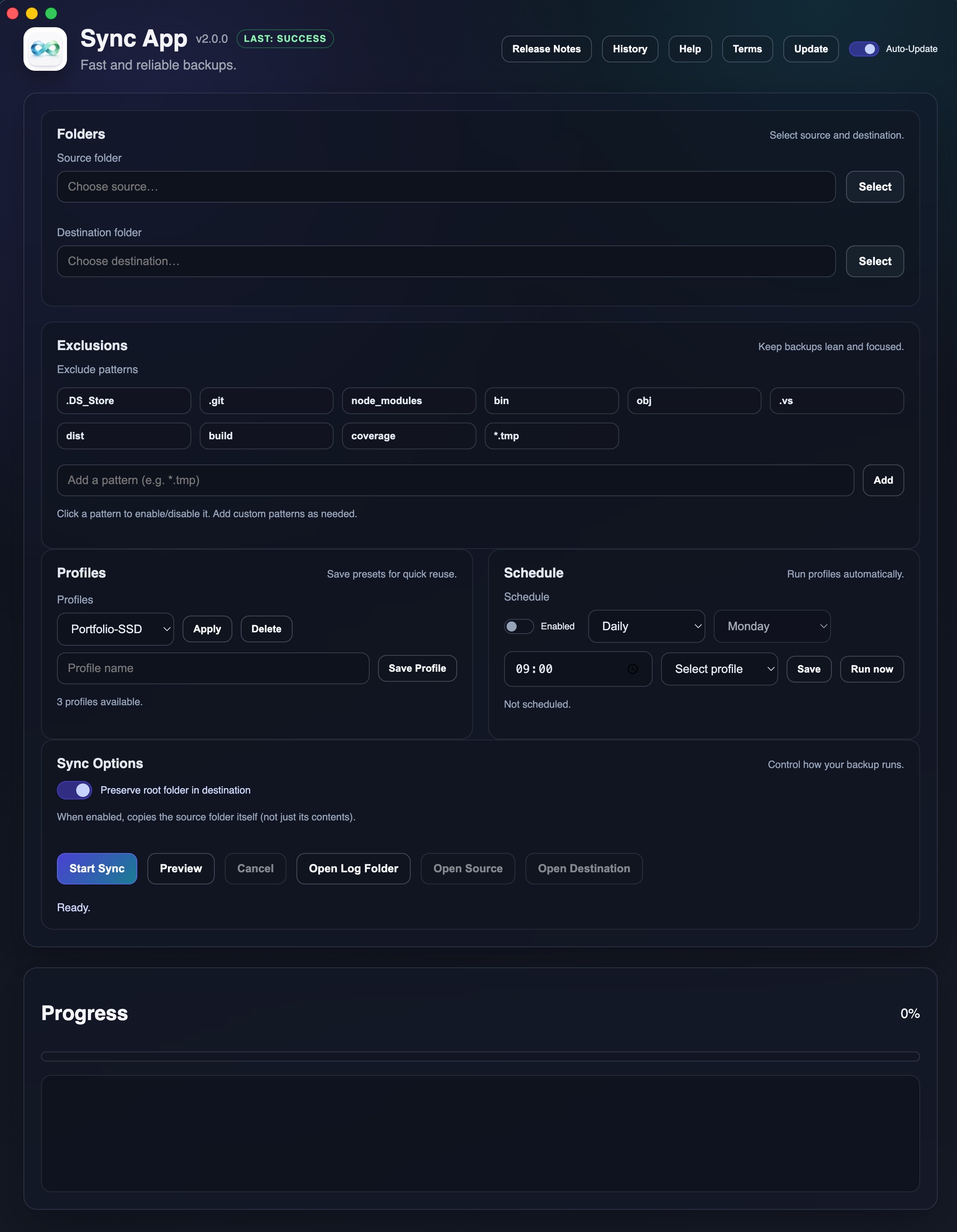
Why Sync App?
Built for users who want simple, dependable backups without enterprise complexity — and without the slowdowns of Finder copies.
- Faster than Finder for large or repeated syncs
- Incremental by default — only copies what changed
- Profiles — save and reuse source/destination pairs
- Scheduling — automated daily or weekly syncs
- Notifications — macOS alerts on success or failure
- History & Logs — timestamps, durations, and per-file details
- Preview mode — validate before writing any files
✨ Core Features
📁 Folders + Sync Engine
- • Native folder picker for Source and Destination
- • Powered by rsync for speed and resilience
- • Option to preserve root folder structure
🚫 Exclusion Patterns
- • Skip .git, node_modules, *.tmp, etc.
- • Toggleable chips with tooltips
- • Add custom patterns in one click
💾 Profiles
- • Save named presets (e.g., "Work-SSD", "Photos-Archive")
- • Apply or delete profiles instantly
- • Fast reuse for common backup scenarios
📅 Scheduling
- • Schedule daily or weekly syncs
- • Choose which profile to run on schedule
- • Works automatically while app is open
🔔 Notifications
- • macOS notifications on success/failure
- • Click notification to open run log
- • Never miss a failed backup again
📊 History + Logs
- • Full run history with timestamps and durations
- • Total bytes synced and average speed
- • Per-file logs saved for every run
🚀 From Code to Release: A DevOps Approach
When I built Sync App, I treated it like a real product — not just a side project. Every release follows a repeatable DevOps pipeline that keeps builds traceable, eliminates the "which file is the right one?" confusion, and gives users a single, reliable download source.
The Release Routine
# 1) Develop and test locally
npm start

# 2) Push code to main
git push origin main

# 3) Tag the version (triggers CI/CD)
git tag v2.0.0
git push origin v2.0.0

# 4) GitHub Actions builds the app
# 5) DMG/ZIP attached to GitHub Release
# 6) Users download from Releases page
What Happens in CI/CD
| Step | What Happens |
|---|---|
| 1. Tag Push | Git tag (e.g., v2.0.0) triggers GitHub Actions |
| 2. Clean Build | Runs npm run dist on a fresh macOS runner |
| 3. Artifacts | Generates DMG and ZIP installers |
| 4. Publish | Uploads to GitHub Releases automatically |
Why This Matters
Repeatable
Every release follows the same process — no manual steps, no surprises.
Traceable
Every binary maps to an exact commit and tag — full audit trail.
Clean Repo
No large binaries in git — artifacts live in GitHub Releases.
Single Source
Users always download from one official location — no confusion.
🛠️ Tech Stack
Runtime
- • Electron (desktop app runtime)
- • Node.js (main process)
- • HTML/CSS/JS (renderer UI)
Build & Release
- • electron-builder (packaging)
- • electron-updater (auto-update)
- • GitHub Actions (CI/CD)
Core Engine
rsync -a --human-readable --out-format=%n|||%l
Fast, battle-tested file sync that powers incremental backups.
📋 Requirements
- ✓macOS 10.15 (Catalina) or later
- ✓rsync available in PATH (pre-installed on macOS)
Ready to simplify your backups?
Download Sync App for macOSFree and open source • No account required